
Trading Lumi for Gold
A step-by-step guide to the Lumi exchange: buy Lumi with Gold, sell Lumi for Gold, read the order book, set your own price and cancel an order.
The Lumi exchange is a market where players swap Lumi and Gold with each other. Players who want Gold sell their Lumi, and players who want Lumi without topping up buy it with the Gold they earned in game. Every price on it is set by players, not by the game, so it moves up and down with what people want.
In short
- Open Marketplace, then the Lumi exchange tab.
- Pick Buy Lumi or Sell Lumi, type how much, and press the big button. The price is already set to the best one on offer, so it trades at once.
- What you get arrives by Mail.
Words you will see
| Word | What it means |
|---|---|
| Lumi | The premium currency. It belongs to your account, so all your characters share it. |
| Gold | The game's money, earned by playing. Each character has its own. |
| Gold per Lumi | The price: how much Gold one Lumi costs. Prices are always whole Gold. |
| Order | One player's offer to buy or sell an amount of Lumi at a price. |
| Best offer | The best price you can trade at right now: the cheapest seller when you buy, the highest buyer when you sell. |
| Last sale | The price of the last Lumi that changed hands. |
| Order book | The list of every order still waiting, shown under Offers. |
Open the Lumi exchange
- Press Marketplace on your HUD menu.
- Choose the Lumi exchange tab, between Exchange and My transactions.
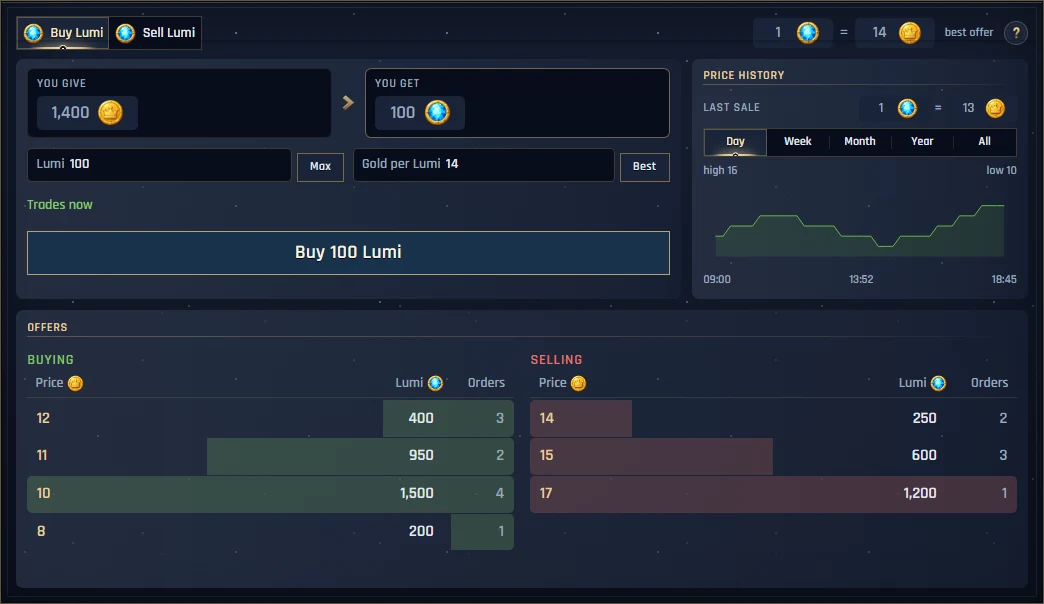
The window has four parts:
- The top bar: Buy Lumi or Sell Lumi, the current rate (for example "1 Lumi = 14 Gold, best offer") and the ? with a short reminder of how it works.
- The form (top left): how much Lumi, the price, what you give and what you get, and the button that trades.
- Price history (top right): the last sale and a chart of the price over a day, week, month, year or all time.
- Offers (bottom): the order book, with buyers and sellers side by side.
Read the order book
Offers has two columns:
- Buying (green, left): players who want Lumi and offer Gold for it. The highest price is on top.
- Selling (red, right): players who offer their Lumi for Gold. The cheapest price is on top.
Every line is one price, with three numbers:
- Price: Gold for one Lumi.
- Lumi: how much Lumi is waiting at that price, all orders together.
- Orders: how many players' orders make up that line.
The coloured bar behind a line shows how big it is next to the other lines in its column. In the picture above, the top Selling line reads 14 · 250 · 2: two players together sell 250 Lumi at 14 Gold each. The top Buying line reads 12 · 400 · 3: three players together want 400 Lumi and pay 12 Gold each.
Press any line to copy its price into the form. Pressing a Selling line switches the form to Buy at that price; pressing a Buying line switches it to Sell. The book refreshes by itself every few seconds while the window is open.
Buy Lumi, step by step
- Choose Buy Lumi in the top bar.
- In Lumi, type how much you want. Max fills in as much as your Gold can pay for at the price in the form.
- Leave Gold per Lumi as it is: it starts at the cheapest seller. If you changed it, Best puts it back.
- Read You give (your Gold) and You get (the Lumi). Under them it says Trades now.
- Press Buy … Lumi and confirm.
Example. The cheapest seller asks 14 Gold. You type 100 Lumi: You give 1,400 Gold, You get 100 Lumi, Trades now. Press the button, confirm, and the Lumi is on its way by Mail.
If you buy more than the cheapest line holds, the rest is bought from the next lines up, each at its own price. You never pay more than the price in your form, and if part of it ends up cheaper, the Gold you did not need comes back by Mail.
Sell Lumi, step by step
- Choose Sell Lumi in the top bar.
- In Lumi, type how much to sell. Max puts in all the Lumi you hold.
- Gold per Lumi starts at the highest buyer. Best puts it back there if you changed it.
- Read You get: the Gold you receive after the exchange's small fee on every sale. The ? says how big the fee is.
- Press Sell … Lumi and confirm.
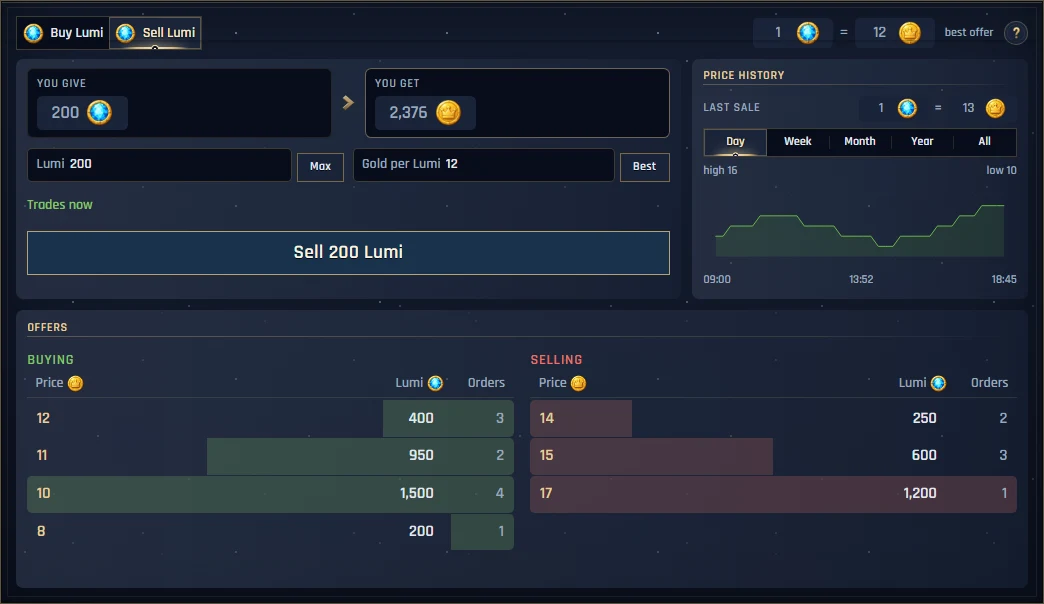
Example. The highest buyer pays 12 Gold. You sell 200 Lumi: 200 × 12 = 2,400 Gold, minus the fee, so You get 2,376 Gold. It trades at once and the Gold arrives by Mail.
Set your own price (orders that wait)
You do not have to take the best offer. Type a better price for yourself and your order waits in the order book until another player accepts it.
- Under the amounts the form then says Waits for another player, and a time picker appears: 12, 24 or 48 hours.
- If only part of it can trade now, it says … now, … waits: that part trades at once and the rest waits.
- While it waits, your order shows in Offers with everyone else's, and other players can trade with it at any moment.
Example. The highest buyer pays 12 Gold, but you want 13. You set Gold per Lumi to 13 and sell 200 Lumi for 24 hours. Your 200 Lumi now stands in the Selling column at 13. When another player buys it, the Gold comes to you by Mail. If nobody buys it within 24 hours, the order ends and your Lumi comes back.
A buy order works the same way: offer less than the cheapest seller asks, and your order waits in the Buying column.
Where your Lumi and Gold arrive
- Everything you get from the exchange, Lumi and Gold, arrives by Mail. Open your mailbox and take it.
- Lumi lands on your account, so every character on it can spend it.
- While an order waits, what it would pay with is set aside for it: your Gold for a buy order, your Lumi for a sell order. You cannot spend that part elsewhere until the order trades, is cancelled or runs out of time.
Check or cancel your orders
- Open the My transactions tab in the Marketplace.
- Every order you placed is listed, with how much of it has traded so far.
- Cancel a waiting order there to take back whatever has not traded yet. It comes back by Mail.
Good to know
- Prices are whole Gold. 12 or 13, never 12.5.
- Up to 20 waiting orders per account on the Lumi exchange. Orders that trade at once do not count.
- Your own orders never trade with each other. Lumi is shared by your whole account, so an order from one of your characters will not fill another one of yours.
- Every trade is final. Check You give and You get before you confirm.
- When the exchange is closed its tab is greyed out and no new order can be placed, but waiting orders can still be cancelled in My transactions.
Tips
- In a hurry? Keep the price the form suggests: it trades at once.
- Want a better deal? Look at the Last sale and the price history first, then set a price a little better than the best offer and let it wait.
- A big line in the book means many players want that price. It can be a good place to buy into or sell into.
- Buying Lumi with Gold is a way to get Tamer Store goods by playing. Selling Lumi is a way to turn a top up into Gold.
Questions
I traded, but my Lumi or Gold is not there.
It is in your Mail. Open the mailbox and take it.
The button is greyed out.
The red line under it says why: you may not have enough Gold or Lumi, the amount or price may be empty, or you may have lost connection.
It said nothing traded.
Someone took that offer a moment before you. Look at the book again and try the new best price.
My Gold went down although nothing traded yet.
That Gold is set aside for your waiting buy order. Cancel the order in My transactions to get it back.